
Love black and white images ? Visit our exclusively black and white photoblog Monochromia – http://groupexpo.wordpress.com
Photo by Stacy !

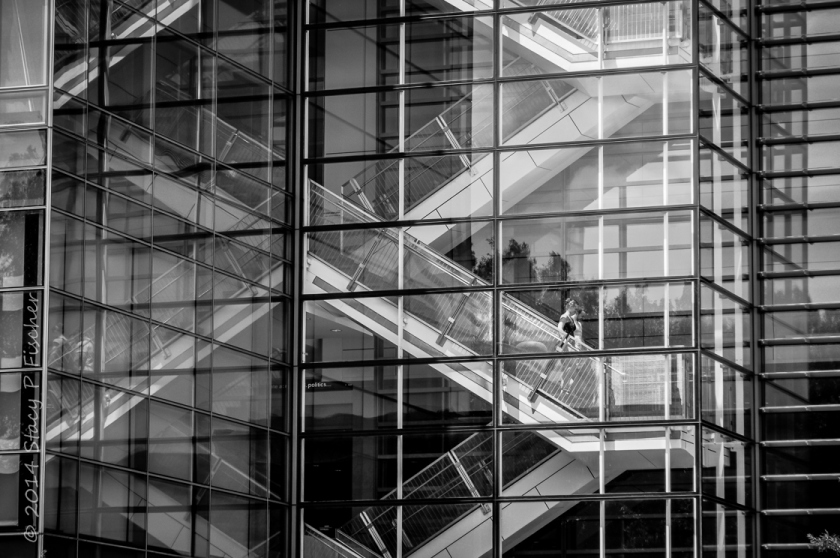 Newseum, Washington, D.C.
Visit VisualVenturing.com for more of my work.
Love black and white images ? Visit our exclusively black and white photoblog Monochromia – http://groupexpo.wordpress.com
Photo by Stacy !
Newseum, Washington, D.C.
Visit VisualVenturing.com for more of my work.
Love black and white images ? Visit our exclusively black and white photoblog Monochromia – http://groupexpo.wordpress.com
Photo by Joerg !

More of my images can be seen at – The Things As They Are In Pictures
Today I would like to discuss some of the various photo editing programs available to post process your images. I will also give you my views on Macintosh versus Microsoft Windows systems. Please note I am not advocating or endorsing one type of computer OS over the other I am merely stating my experience with both. Todays post was actually inspired by a question from Gale in Florida about post processing.
Lets discuss computers first because I want to be brief on this subject. I personally prefer the Macintosh OS over Windows (and this is coming from a person who owned a computer business for ten years building generic computers running Microsoft Windows). Like I said I am not endorsing I am merely stating my preferences. I find the Macintosh systems seem to require less system resources than Windows systems while running the same programs.
Huh ?
Okay let me give you an example. I sometimes will edit images on my Macbook Air computer which only has 4 GB of RAM without issue. Of course I would prefer to edit images on my Mac Mini with 16 GB of ram and a big screen but sometimes I would rather just sit on the couch with my wife and edit images on my Macbook. If I were using a Windows based system with the same processing power and 4 GB of RAM, running Adobe Lightroom 5 would be frustrating for me. In my experience the Mac programs seem to load faster than the Windows counterparts and take up less hard drive space. Some of you might say RAM is pretty cheap these days so why not just add some memory and use the Windows systems. That’s wonderful if Windows is your preference but when comparing apples to apples (no pun intended) the Mac system will load programs faster with the same processing power and memory, and I am confident saying that. The other thing I prefer about the Mac system is all of the Apple software such as word processing, spreadsheet and presentation is free and will import Microsoft Word or Excel files. The OS (operating system) upgrades are also free so I don’t have to spend money when the next generation of software is available. If I wanted to start processing RAW files immediately iPhoto is already on the Mac so if I didn’t have the extra cash to spend on Adobe Lightroom at the time I could still shoot RAW images with my camera and post process them. These are some of the reasons the Mac system is a better fit for me. As I stated previously I am not endorsing or suggesting one system over another, I am just stating which works better for me, and why I prefer it.
Okay so lets get to the meat of the post, image editing programs now that I started the controversy about computers above.
When you buy a camera most of the time it will come with a CD that has their own brand of image editing software. These proprietary programs are used if you shoot RAW images because for some stupid reason every camera manufacturer has their own RAW files. With Nikon the files have an .NEF extension, with Olympus they end in .ORF.
Why these files are different is beyond my scope of understanding but it would just make a little more sense to me if all these manufacturers would get together and standardize a file format for RAW images. They did it with .JPG images so why not RAW.
Adobe Lightroom is in my opinion the standard for post processing images for people like me (advanced amateur). You can import just about any file format including RAW images into one program.
But Joe why would I spend money on Lightroom if my camera already came with a software CD ?
Thats a really good question Joe, I’m glad I asked me. Lets use me as an example.
I am a long time Nikon user as most of you already know. Lets say I was a loyal user of the software provided by Nikon to post process images. I took the time to learn all aspects of the Nikon software and I am so familiar with it I can process images with my eyes closed (which would be a pretty neat trick).
Now I decide to buy a Fuji camera because I heard great things about their image quality. I’m very excited when I get my new Fuji home and while I am waiting for the battery to charge I decide to load the software that came with my new camera. I eagerly await for the software to finish installing and as soon as it finished I quickly open the program.
What the hell is this ?
This is nothing like the Nikon software I am accustomed to. Oh crap this is totally different and now I have to learn a whole different program to process my Fuji RAW files.
This is the exact reason you invest in Adobe Lightroom. You take the time to learn Lightroom and it will import any brand of camera RAW files along with .JPG’s of course. You learn one program and use it for all of your post processing needs. By taking the time to learn Lightroom you streamline your post processing immediately.
Another great feature of Lightroom is Plug Ins. Practically every manufacturer of image editing programs provides Plug Ins for Lightroom. For example I use NIK software’s Silver EFEX Pro sometimes to process my black and white images. They provide a Plug In so I can run Silver EFEX from within Lightroom. I just drop down one of the menus in Lightroom choose to edit my image in Silver EFEX and when I am done it automatically exports my image to Lightroom and puts me right back to where I was before I dropped down the menu. I actually use the complete suite of NIK software programs but since Google purchased the company I find myself using a suite of programs fro onOne software called Perfect Photo Suite (which by the way is a free download). When onOne comes out with new versions of their image editing suites the make the previous versions available for free. I would imagine they do this in hopes you will love their software and upgrade to their latest version, which is not free. To me the current version is well worth the $89 they charge for it. The NIK software suite is also very nice but I just find myself using the onOne software more recently.
There are free programs available such as Google Picasa that you can use for post processing your images which is fine. I just don’t think anything can match the power and versatility of Adobe Lightroom and the Plug Ins capability is just an added bonus to me.
So I hope all of you found this post of some use and I hope I cleared up some questions that you had Gale.
Love black and white images ? Visit our exclusively black and white photoblog Monochromia – http://groupexpo.wordpress.com
Photo by Louise !
Love black and white images ? Visit our exclusively black and white photoblog Monochromia – http://groupexpo.com
Photo by Robyn !
 Lines and Drama at Sunrise
“What is drama but life with the dull bits cut out.” – Alfred Hitchcock

Fujifilm X-T1 and Fujinon XF 60mm f/2.4 R Macro lens – 1/1200 @ f/2.8 – ISO 200

Fujifilm X-T1 and Fujinon XF 60mm f/2.4 R Macro Lens – 1/480 @ f/2.4 – ISO 200
Love black and white images ? Visit our exclusively black and white photoblog Monochromia – http://groupexpo.wordpress.com
Photo by Joe !

Sony RX100 Mk 1 (compact camera) in macro mode – 1/100 @ f/4.5
To me photography is not always about beautiful scenic landscape images. It’s about simple every day things. What attracted me to the leaf of this Lambs Ear plant was the shape of it. It looks like it was sticking it’s tongue out at me :)
More of my images can be seen at – The Visual Chronicle
Love black and white images ? Visit our exclusively black and white photoblog Monochromia – http://groupexpo.wordpress.com
Photo by Elina !

We met this little mouse in an abandoned building. Three photographers trying to capture a photo of a tiny mouse that was running around the room was a wonderfully joyful moment. I think it was the only time we were laughing and having real fun during our visit to those abandoned homes that have been left behind and are falling apart, no-one taking care of them anymore.
Love black and white images ? Visit our exclusively black and white photoblog Monochromia – http://groupexpo.wordpress.com
Photo by Alex !
Love black and white images ? Visit our exclusively black and white photoblog Monochromia – http://groupexpo.wordpress.com
Photo by Emilio !

For a high res split tone version, please click on the image
Lake Las Vegas is a 320-acre man made lake surrounded by 3,592 acres developed by 5 companies.
When first opened in 2003, the area included several hotels and casinos including the Monte Lago Village Resort, the Westin Lake Las Vegas Resort, the Hilton Lake Las Vegas, and Casino MonteLago.
Lake at Las Vegas Joint Venture, LLC filed for Chapter 11 bankruptcy on July 17, 2008. Debts were estimated at between $500 million and $1 billion.
Lake Las Vegas emerged from bankruptcy in July 2010. The creditors have filed a lawsuit against the former insiders. In a related action, resort property owners are suing lender Credit Suisse as part of a multi-billion dollar lawsuit claiming the bankruptcy was caused by a scheme between the bank and…
View original post 155 more words


 The Visual Chronicle